Native and fast
A GPU-rendered native window — not Electron, Tauri, or a WebView. One interface across macOS, Linux and Windows, in a download of about 16 MB.

Open source · Apache-2.0
A native, cross-platform HTTP API client built with Rust + GPUI
GPU-rendered · Light on resources · No account · Your data stays local · No Electron, No Tauri, No WebView
macOS · Windows · Linux
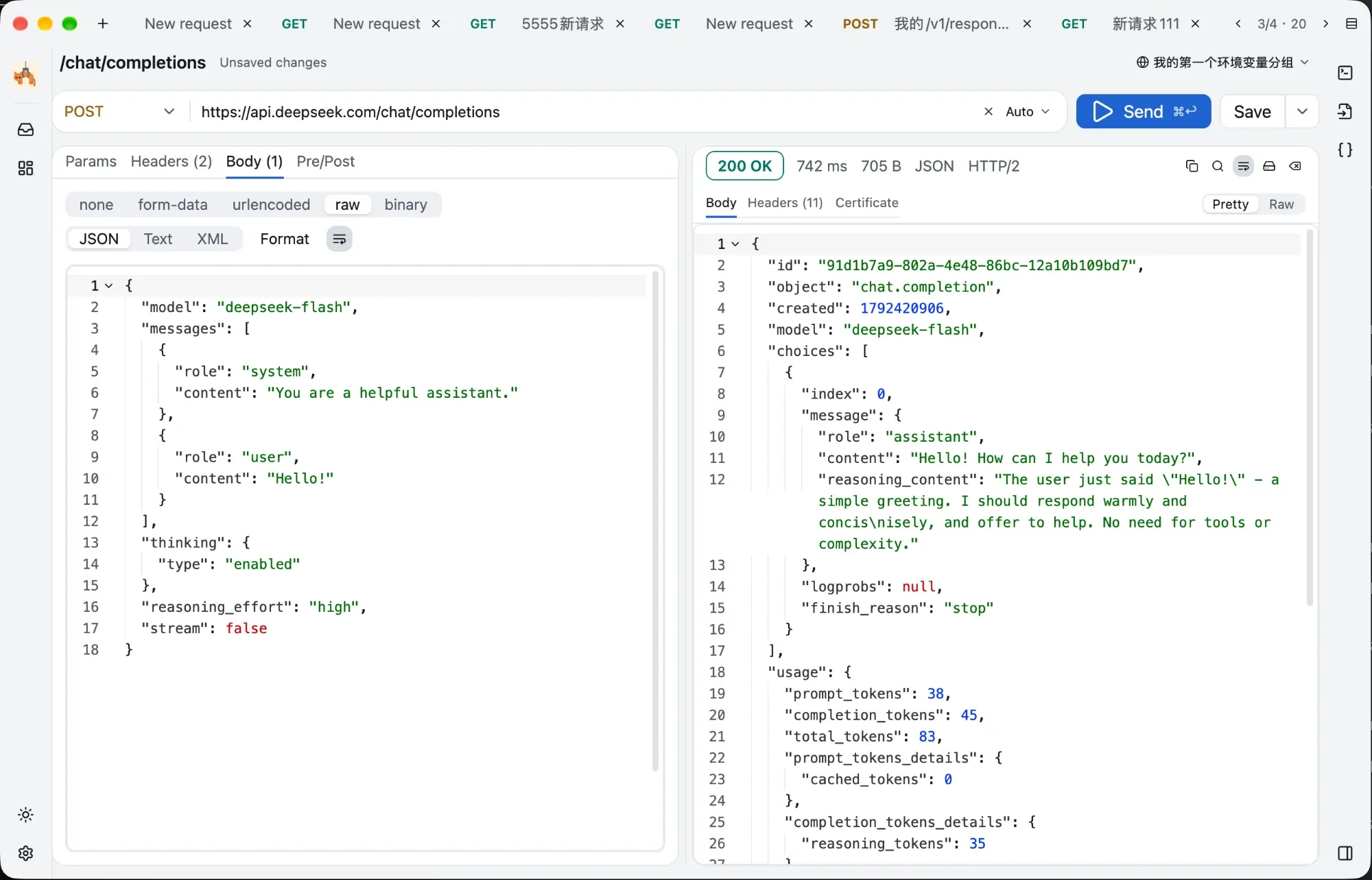
Everything below is what GetCat actually does today — no roadmap items dressed up as features.
A GPU-rendered native window — not Electron, Tauri, or a WebView. One interface across macOS, Linux and Windows, in a download of about 16 MB.
Streamed reception, live progress, cancel at any time. The main thread never does O(n) work, so a few hundred MB of JSON will not lock up the window.
Seven methods, path/query/header tables with a description column, and every body type from raw JSON to streamed file uploads.
No history, no stored responses, nothing uploaded anywhere. Saved requests and settings are pretty-printed JSON files you can hand-edit and track in Git.
Every tab's draft is written to disk and restored on restart. Tab order, split direction and theme preference are all remembered.
Theme and language follow the OS, or pin them. The title bar is custom-drawn, so all three platforms look the same. Every control has an accessible name and works with screen readers.
The app interface is available in English, 简体中文, 繁體中文, 日本語 and Français.
Everything you need to shape a request — and a one-click export that matches exactly what GetCat puts on the wire.
Write {name} anywhere in the URL and it shows up in the path parameter table automatically.
{name} placeholders in the URL.cURL, cURL for Windows cmd, or Python requests — copied with one click. The generator reuses the very same assembly logic that sends the request, so the code you copy is the request GetCat would have made.
curl -X POST 'https://api.anthropic.com/v1/messages' \
  -H 'x-api-key: YOUR_API_KEY' \
  -H 'anthropic-version: 2023-06-01' \
  -H 'Content-Type: application/json' \
-d '{"model":"claude-opus-5","max_tokens":1024,"messages":[{"role":"user","content":"Hello"}]}'import requests
url = "https://api.anthropic.com/v1/messages"
payload = "{\"model\":\"claude-opus-5\",\"max_tokens\":1024,\"messages\":[{\"role\":\"user\",\"content\":\"Hello\"}]}"
headers = {
"x-api-key": "YOUR_API_KEY",
"anthropic-version": "2023-06-01",
"Content-Type": "application/json"
}
response = requests.request("POST", url, data=payload, headers=headers)
print(response.text)It deliberately leaves out TLS, redirect and timeout options: those are GetCat settings, not part of the request itself.
How the response is displayed depends on its size — the main thread is never asked to do O(n) work.
| Tier | When | How it is shown |
|---|---|---|
| Highlighted editor | up to 5 MB and 200,000 lines | Full syntax highlighting, line numbers, folding, in-response search. |
| Line-virtualised | up to 64 MB | Plain text rendered row by row, so only what fits on screen is laid out. |
| Spilled to disk | larger than 64 MB | Written to a temporary file. The first 1 MiB is previewed with a summary, plus one-click save and open. |
While it is downloading: Live byte count against the total, refreshed about every 33 ms, and a cancel button that works at any point.
Alongside Body and Headers there is a Certificate tab: GetCat parses the peer leaf certificate offline and shows what it found.
TLS verification is off by default so you can hit local self-signed endpoints without ceremony. The request still goes out, and GetCat still inspects the certificate offline and warns you about the four cases above. Turn verification on in Settings and a bad certificate aborts the handshake instead.
One click gives you a tab with the URL, auth header and body already filled in. The real value is the multimodal shapes below: no two of these three APIs agree.
OpenAI Chat Completions, OpenAI Responses and Anthropic Messages, each in a text-only, an image and a streaming variant. The sidebar also has MCP templates for both protocol eras.
Replace YOUR_API_KEY before sending — or keep the key in a variable, write {{API_KEY}} in its place, and mark it secret so it is masked on screen.
POST https://api.openai.com/v1/chat/completions
{
  "model": "gpt-5.6",
  "messages": [
    {
      "role": "user",
      "content": [
        { "type": "text", "text": "What is in this image?" },
        {
          "type": "image_url",
          "image_url": {
            "url": "https://example.com/cat.jpg",
            "detail": "auto"
          }
        }
      ]
    }
  ],
  "max_completion_tokens": 1024
}
The image block is image_url, and image_url is an object with url and detail. The token cap is max_completion_tokens, not max_tokens.
POST https://api.openai.com/v1/responses
{
  "model": "gpt-5.6",
  "input": [
    {
      "role": "user",
      "content": [
        { "type": "input_text", "text": "What is in this image?" },
        {
          "type": "input_image",
          "image_url": "https://example.com/cat.jpg"
        }
      ]
    }
  ],
  "max_output_tokens": 1024
}
Responses renames the content blocks to input_text and input_image, and here image_url is a plain string rather than an object. The cap is max_output_tokens.
POST https://api.anthropic.com/v1/messages
{
  "model": "claude-opus-5",
  "max_tokens": 1024,
  "messages": [
    {
      "role": "user",
      "content": [
        {
          "type": "image",
          "source": {
            "type": "url",
            "url": "https://example.com/cat.jpg"
          }
        },
        { "type": "text", "text": "What is in this image?" }
      ]
    }
  ]
}
Anthropic uses image plus a source object. max_tokens is required, and the image block is placed before the text block, as their docs recommend.
No database, no cloud, no account. Everything GetCat remembers is a JSON file you can open, edit and commit.
| Platform | Directory |
|---|---|
| macOS | ~/Library/Application Support/GetCat/ |
| Linux | $XDG_DATA_HOME/getcat/ |
| Windows | %APPDATA%\GetCat\data\ |
| Action | macOS | Windows / Linux |
|---|---|---|
| Send | ⌘ Enter | Ctrl Enter |
| New tab | ⌘ T | Ctrl T |
| Close tab | ⌘ W | Ctrl W |
| Toggle sidebar | ⌘ B | Ctrl B |
| Save request | ⌘ S | Ctrl S |
| Search in response | ⌘ F | Ctrl F |
| Settings | ⌘ , | Ctrl , |
Writes are atomic — a temporary file is swapped into place, so a crash never leaves half a file behind. A file that fails to parse is renamed to .corrupt-<time> and skipped. Headers such as Authorization are stored as plain text, the same as the local databases of Postman and Insomnia, with 0600 permissions on Unix.
This list is here so you know before you download, and so nobody has to guess by analogy with other tools:
request history · JavaScript pre-request and test scripts · a dedicated auth panel · cookie management · folder trees · GraphQL, WebSocket and gRPC · team sync and cloud accounts
Every build is on GitHub Releases, mirrored in mainland China. Links always point at the latest version.
Apple Silicon
GetCat-macos-arm64.dmg
Intel
GetCat-macos-x64.dmg
x64 · portable
GetCat-windows-x64.exe
arm64 · portable
GetCat-windows-arm64.exe
x64 · installer
GetCat-windows-x64.msi
arm64 · installer
GetCat-windows-arm64.msi
x64
GetCat-linux-x64.tar.gz
arm64
GetCat-linux-arm64.tar.gz
Signed and notarised — drag it into Applications.
The MSI installs per-user, no administrator needed, and appears in the Start menu. The portable exe runs from anywhere and writes nothing to the registry.
Unpack it and put the binary on your PATH. A .desktop entry is one file away — the commands are below.
tar -xzf GetCat-linux-x64.tar.gz
install -Dm755 getcat ~/.local/bin/getcat
mkdir -p ~/.local/share/applications
cat > ~/.local/share/applications/getcat.desktop <<EOF
[Desktop Entry]
Type=Application
Name=GetCat
Exec=$HOME/.local/bin/getcat
Categories=Development;
EOF
The Windows builds are not code-signed yet, so SmartScreen will stop the first run: choose More info, then Run anyway.
GetCat checks GitHub Releases once, five seconds after launch, and never downloads anything on its own. When you choose to update, the download is verified against both SHA-256 and a minisign signature before it is installed.
All versions and release notesGetCat draws with the GPU, so the graphics stack matters more than the CPU.
macOS 11 Big Sur or newer, on Apple Silicon or Intel. The disk image is signed and notarised.
Windows 10 version 1803 (April 2018 Update) or newer, or Windows 11. Rendering goes through Direct3D 11 at feature level 10.1 — roughly any GPU from 2010 onwards. DirectX 12 is not required.
Mainstream desktop distributions from 2022 onwards: Ubuntu 22.04+, Debian 12+, Fedora 36+, Linux Mint 21+, openSUSE Leap 15.6+, and rolling releases such as Arch. The floor is glibc 2.35, so Ubuntu 20.04, Debian 11 and RHEL 9 derivatives will not run it.
The interface renders through Vulkan. If the window comes up black, check the driver first with vulkaninfo --summary, then install the package for your GPU:
| GPU | Package |
|---|---|
| Mesa | mesa-vulkan-drivers |
| Intel | vulkan-intel |
| AMD | vulkan-radeon |
| NVIDIA | nvidia-driver |
Nouveau has no Vulkan support — NVIDIA cards need the proprietary driver. Inside a virtual machine, rendering falls back to lavapipe software rasterisation, which works but is slow.
GetCat is a focused subset. There is no account, no cloud sync, no collections and no scripting: variables, environments and response assertions are there, but you fill them in as table rows rather than write JavaScript. In exchange you get a 16 MB native application that starts instantly, keeps every byte on your machine, and handles very large responses without stalling. If you need team collaboration or test suites, Postman or Insomnia remain the right tools.
GetCat is written in Rust on top of GPUI, the same UI framework the Zed editor uses. The window is drawn by the GPU rather than by a browser engine, which is what keeps the download around 16 MB and lets the response pane stay responsive while hundreds of megabytes stream in. Networking runs on a Tokio runtime and results are sent back to the UI thread over a channel, so the main thread never does O(n) work.
Nothing is uploaded — there is no telemetry, no account and no sync. Saved requests, drafts, settings and variables are pretty-printed JSON files in your platform data directory, which you can hand-edit or keep in Git. Header values such as Authorization — and secret variables, which are only masked on screen — are stored as plain text, the same way the local databases of Postman and Insomnia do it, with 0600 permissions on Unix.
So that hitting a local endpoint with a self-signed certificate just works, which is the common case while developing. The request still goes out, and GetCat still parses the peer certificate offline and warns you if it is expired, not yet valid, issued for a different hostname, or self-signed with no chain of trust. Turning verification on in Settings restores strict behaviour: a bad certificate aborts the handshake.
Variables and assertions, yes; team collaboration, no. Variables live in three scopes — global, category and environment — and {{var}} is substituted throughout the request, alongside dynamic values such as {{$timestamp}}. Pre- and post-request operations set variables before sending, then extract response fields into variables and assert on the status code, headers or JSON — all from a table, with no scripting. Postman environment files can be imported and exported, and secret variables are masked on screen. Still deliberately left out: scripting, a cookie jar, a folder tree and shared workspaces, to keep the application small and predictable.
The interface renders through Vulkan, and a black window almost always means the Vulkan driver is missing. Run vulkaninfo --summary to confirm, then install mesa-vulkan-drivers, vulkan-intel or vulkan-radeon depending on your GPU. NVIDIA cards need the proprietary driver — nouveau has no Vulkan support. In a virtual machine it falls back to lavapipe software rendering.
No. GetCat speaks HTTP only. You can of course POST a GraphQL query as a JSON body, but there is no schema introspection, no subscription support and no protocol-specific UI.
It is free and open source under Apache-2.0. There is no paid tier, no account and nothing to sign up for. The source, the issue tracker and every build are on GitHub.